360° feedback · Start free
360° feedback, ready to run. Powerful enough to grow with you.
Start with a ready-to-use 360° setup, invite the people who work with you, and turn their feedback into clear development insights.
No credit card to start · Ready-to-explore demo workspace · Unlimited raters on every evaluation
Julian Varma
- Overall77%
- Who answeredSelf 1 · Manager 1 · Peers 3 · Direct Reports 3
- StrongestCommunication & Interpersonal Skills94%
- To developExecution & Results61%
Strengths and gaps
Highest-rated dimensions
- Communication & Interpersonal Skills 94%
- Leadership & Influence 82%
- Potential 77%
Lowest-rated dimensions
- Execution & Results 61%
- Strategic Alignment & Vision 69%
- Potential 77%
Widest self vs others gaps
- Execution & Results self 75%, others 58%
- Leadership & Influence self 75%, others 86%
The report screen, with the data of a demo evaluation.
Start simple
Your first 360° shouldn't be a setup project.
Choose who the 360° is about and the feedback givers are filled in from your company structure. Review the summary and send.
- Explore a working workspaceNew Free accounts include six demo profiles and three sample departments.
- Start with the 360° structureUse the ready-to-run feedback setup and choose the relevant perspectives: self, manager, peers, direct reports and external stakeholders.
- Invite, collect, reviewSend invitations, follow progress and bring the responses together in one place.
 360 Feedback
Setup wizard, step 2: the feedback givers.
360 Feedback
Setup wizard, step 4: review and send the invitations.
Julian Varma
- Self1 / 1
- Manager1 / 1
- Peers3 / 3
- Direct Reports3 / 3
Progress screen: who has answered, by feedback group.
The results
Feedback your team can read, discuss and use.
KS-Agents brings together perspectives, competencies and qualitative feedback in a report you can explore on screen and present professionally.
Julian Varma
They will see the aggregated results and the comments, without the names of the raters.
- Overall77%
- Who answeredSelf 1 · Manager 1 · Peers 3 · Direct Reports 3
- StrongestCommunication & Interpersonal Skills94%
- To developExecution & Results61%
Profile
| Dimension | Score |
|---|---|
| Strategic Alignment & Vision | 69% |
| Leadership & Influence | 82% |
| Communication & Interpersonal Skills | 94% |
| Execution & Results | 61% |
| Potential | 77% |
Strengths and gaps
Highest-rated dimensions
- Communication & Interpersonal Skills 94%
- Leadership & Influence 82%
- Potential 77%
Lowest-rated dimensions
- Execution & Results 61%
- Strategic Alignment & Vision 69%
- Potential 77%
Widest self vs others gaps
- Execution & Results self 75%, others 58%
- Leadership & Influence self 75%, others 86%
Report screen of a demo evaluation in the workspace "KS-Agents Demo".
Individual report · 360 Report Studio
A complete view of one person
Explore overall scores, competency charts, differences between self-assessment and other reviewers, strengths and development priorities.
By feedback group
360 Report Studio chart, drawn by the product's chart code with the scores of the same demo evaluation.
Professional PDF report
Reports built for real conversations
Use the report in a development meeting, a coaching programme or a leadership review.
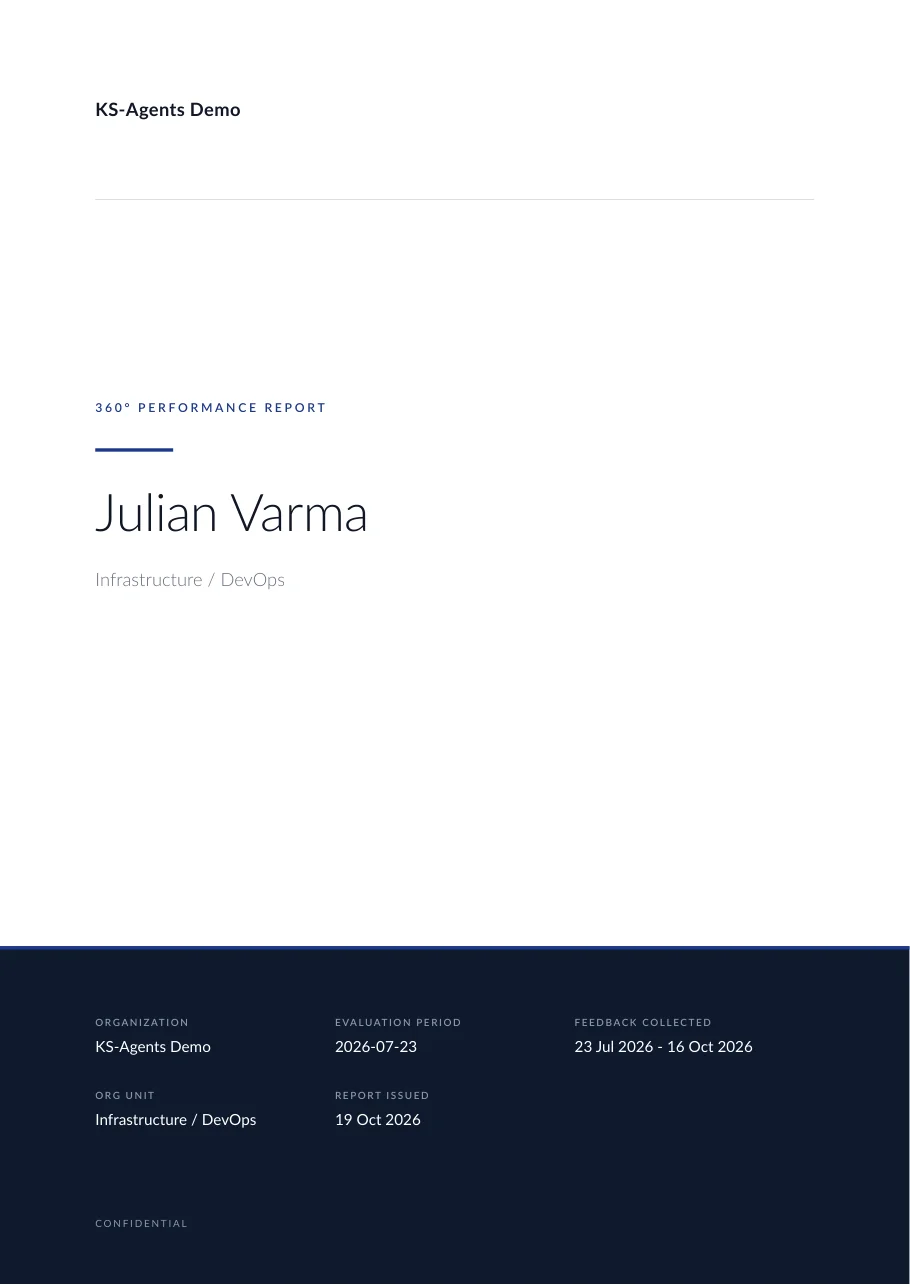
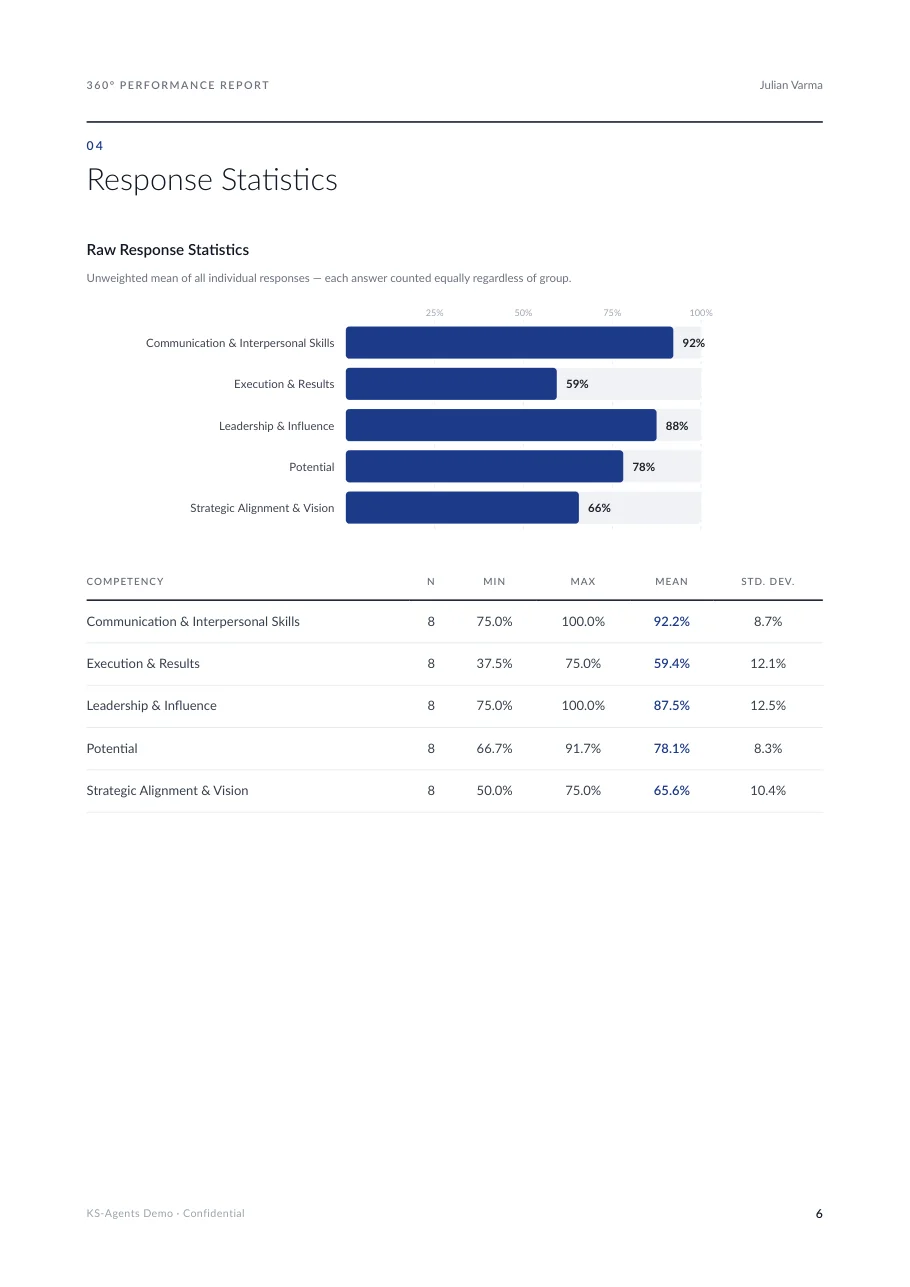
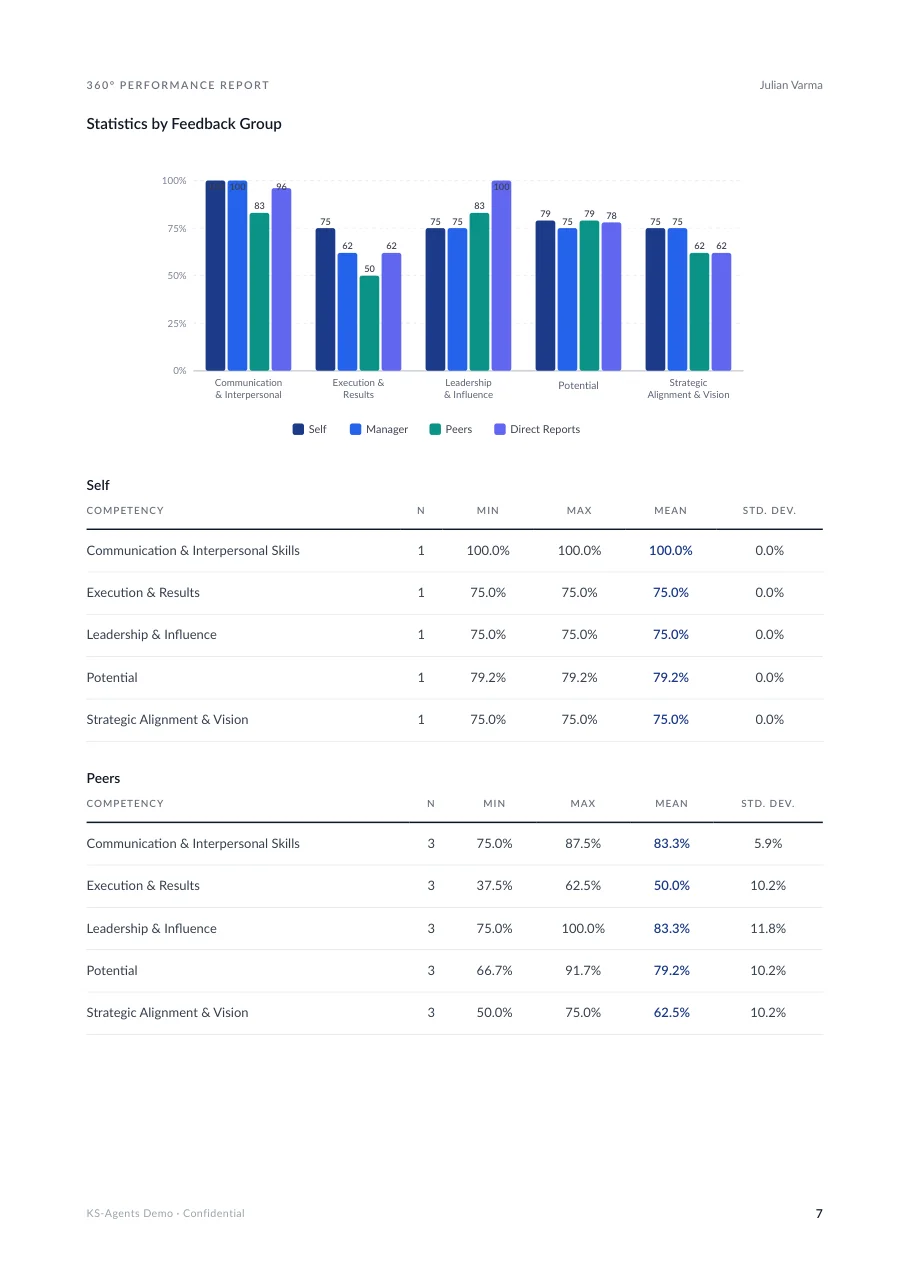
Three pages of a PDF report generated by the product for the same demo evaluation (16 pages in total).
Organisation · Department · Project
Go from individuals to teams
Review aggregated results for an organisation, business unit or project.
How it works
From invitations to a clear development picture.
Choose the people and perspectives
Start with a person or import a group. The system supports self-assessment, manager, peers, direct reports and external customer or stakeholder feedback.
Let the reviews run
Send invitations and reminders, track completion and gather ratings and comments in one place.
Understand the differences
Compare competencies and rater groups, spot gaps between self-perception and outside feedback, and review quantitative results in the Report Studio.
Turn feedback into development
Use AI synthesis when you want a structured narrative with strengths, development areas and practical recommendations.
Optional depth
Start with a simple 360°. Add this depth when the development question calls for it.
Optional AI depth
Understand the behaviour behind the scores.
- Pain Point RadarAs feedback comes in, the radar looks for recurring concerns, notable strengths and differences between reviewer groups.
- Short, adaptive AI follow-upsAfter the survey, an optional AI conversation explores the context behind a response.
Example, illustrative conversation. AI features are optional and use AI Credits.
Deeper assessment
Understand strengths, blind spots and leadership patterns.
- Competency modelExplore the eight competency areas scored in the report, covering leadership, cooperation, communication, analysis, creativity, execution, adaptability and business orientation.
- Big Five self-assessmentAdd an optional personality self-assessment with 120 questions, taken once a year, alongside the feedback provided by colleagues and managers.
- Self-perception vs. observed behaviourCompare self-assessment with multi-rater patterns and highlight blind spots.
Progress and scale
One review shows the present. Repeated reviews show progress.
- Compare evaluation cyclesSee the change from the previous review directly in the individual report.
- Schedule recurring campaignsSet a quarterly, biannual or annual cadence for selected employees, managers, teams or projects.
- Batch launch and invitation digestImport participants from CSV, preview reviewer workload and group multiple assignments into a more manageable invitation flow.
Simple pricing
Start free. Scale without per-user pricing.
Run your first 10 evaluations free, with unlimited raters on each one. Add a single complete evaluation when you want the full report once, or choose Unlimited for ongoing programmes and organization-wide reporting.
Free Plan
Ten free evaluations to run a real 360° with your team.
- 10 free evaluations per workspace, at most 2 per person
- Unlimited raters on every evaluation
- Quantitative report with PDF export
- Six demo profiles and three demo departments
- No credit card required
Single 360 evaluation
One complete evaluation with every 360° Unlimited feature, paid once.
- AI follow-up questions that ask raters what stands behind a rating
- AI summary of the comments in the themes that matter
- Pain point radar and trait alignment
- White-label PDF report with your brand
360° Unlimited
For ongoing 360° programmes across your whole organization.
- Unlimited users and evaluations
- 250 AI credits every month
- Organization report to compare units, projects and people with the organization
- White-label PDF reports with your brand
- 360 Report Studio
or €1,490 a year, the price of 10 months
Get 360° UnlimitedAI Credits power optional AI features. Your surveys and quantitative results continue to work independently of AI usage.
A dedicated 360° product, backed by a broader Performance platform.
360° Unlimited gives you a focused way to run feedback independently.
Frequently asked questions
How many evaluations can I run for free?
Every workspace includes 10 free evaluations, with at most 2 per person and unlimited raters on each one. When you need more, run a single complete evaluation or move to 360° Unlimited.
Is the 360° ready to use, or do I need to build everything first?
It is ready to explore from the start. Free workspaces include six demo profiles and three sample departments, with a 360° structure you can use as your starting point. Choose your real participants, select the relevant reviewer groups and launch your first evaluation.
What do participants actually do?
They respond to feedback surveys relevant to their relationship with the person being evaluated. Depending on the configuration, reviewers may also complete a short AI follow-up conversation to add concrete examples.
Can I run a 360° without AI features?
Yes. The free plan collects ratings, compares reviewer groups and gives you a quantitative report with no AI involved. When you want more depth, 360° Unlimited and the single complete evaluation add AI follow-up interviews and the AI analysis of comments, which use AI credits.
What do I receive at the end of an evaluation?
Every plan lets you explore competency scores and reviewer-group comparisons in the 360 Report Studio and download a PDF. 360° Unlimited and the single complete evaluation add the AI summary of comments, with strengths, development areas and practical recommendations, and white-label PDF reports.
Can we compare results over time?
Yes. KS-Agents supports recurring evaluation cycles and comparisons with previous periods, so you can follow development trends rather than relying on a single review.
Can we use our own competencies, teams and reviewer groups?
Yes. The system supports multiple 360° configurations, adjustable reviewer groups and weights, and organisation structures that include departments, projects and workgroups.
What are Pain Point Radar and AI follow-up interviews?
Pain Point Radar detects recurring themes and differences across reviewer groups as responses arrive. Optional AI follow-up conversations then ask focused questions to collect behavioural examples and add depth to the final analysis.
Does 360° Unlimited include personality and competency analysis?
The KS-Agents 360° system supports optional Big Five self-assessment and analysis of the eight competency areas, including comparisons between self-perception and observed behaviour. These questionnaires are part of 360° Unlimited and of the single complete evaluation.
How is respondent privacy handled?
Administrators can configure anonymous, threshold-based or transparent feedback modes. The system also provides minimum-response thresholds and reporting controls designed to prevent the identification of respondents through small group comparisons.
Is 360° Unlimited the same as Enterprise OS?
No. 360° Unlimited is a dedicated product for multi-rater evaluations. Enterprise OS brings 360° feedback together with broader organisational performance, talent and development workflows.
What happens when AI Credits are used up?
Surveys and quantitative reporting remain available. AI-powered analysis and follow-up functions resume when the relevant AI Credit allowance is available again. 360° Unlimited includes 250 AI credits every month.
Your first 360° can start here.
Begin with a ready-to-use workspace and a small team. When you want deeper insight, more people or repeated evaluation cycles, KS-Agents is already built to support them.
Questions about a larger programme? Contact us.Built in Europe, with your data in the EU
- Infrastructure based on European servers.
- Any workspace can be set to EU data residency, so its AI features use only models hosted in the EU.
- Your content is never used to train AI models.
- Paid plans include a GDPR Data Processing Agreement.